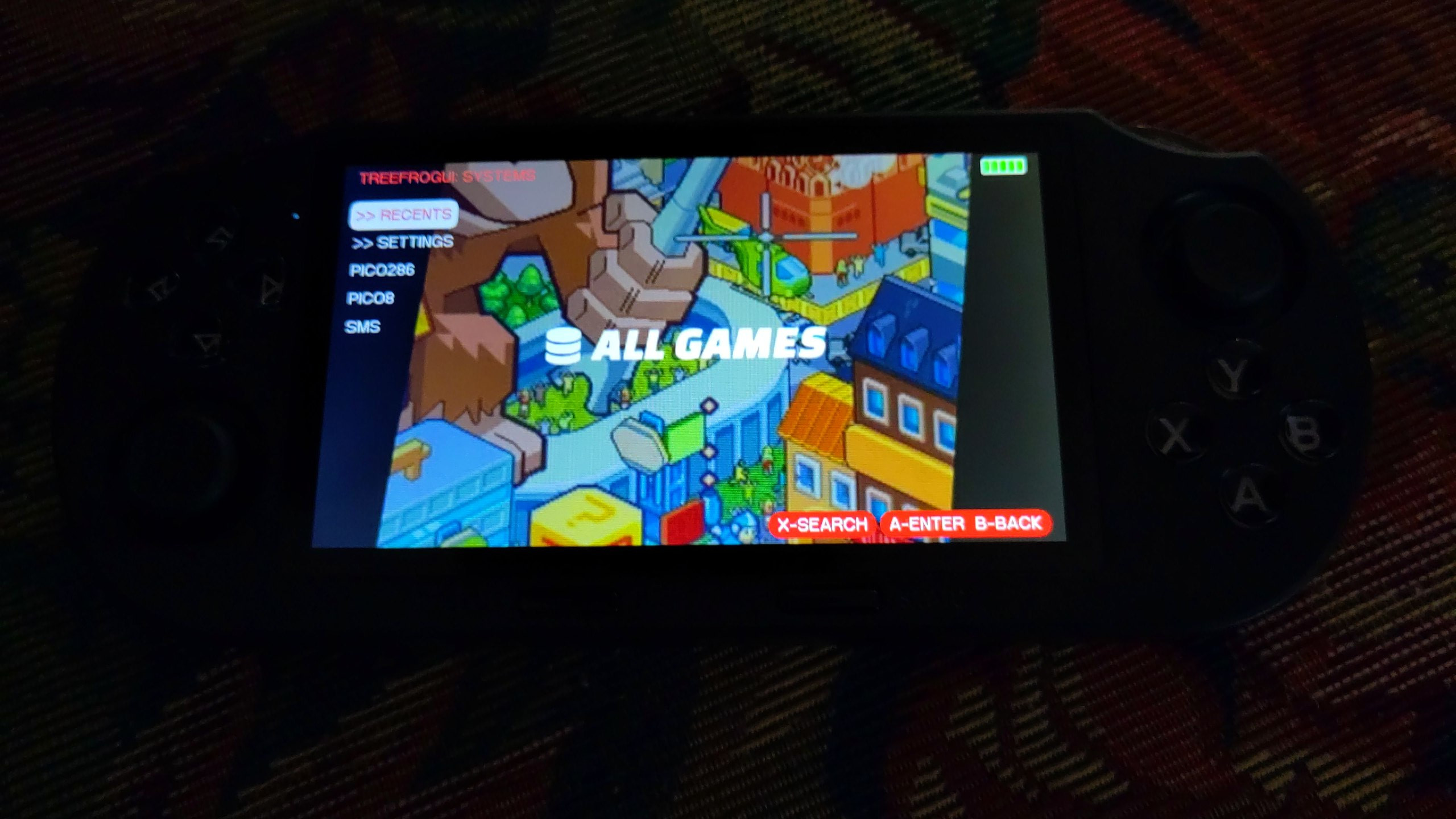
After weeks of saving, mowing the grass for a little extra cash, and putting his meager allowance money into his proverbial piggy bank, my son finally saved up enough dough to buy a retro gaming console. I helped him look through and review a lot of options, and he settled on the SF3000[1] (not affiliate link). It looked like a pretty neat handheld retro gammer, and for the most part, it is/was. However, my wife and I had a few concerns once it arrived.
First, there are a lot of games on there that are not appropriate for him to play, as well as many games that are in other languages. Second, and perhaps more concerning, was that the User Interface (UI) had multiple background images of disproportional anime women wearing skimpy outfits. Not really something I want to promote to my young son.
If you've been around my blog for any length of time, you'll probably note that hacking retro game consoles is not outside of the norm around here [2]. My first order of business was to hack the original firmware and change the backgrounds. This proved a little difficult. It has a removable SD card, but when you plug that card into any computer, the 64GB card would show as 16GB and be unreadable. I monkeyed with that for a while, but eventually found a place that had the full backup of the original 64GB card (download here [3] or here [4]), which I downloaded and, saving the original card as a handy backup, used a fresh card, formated to exFat, and put all the original files on it via "drag and drop" in the file manager.
Once I popped the card back into the SF3000, it seemed to work just fine. I popped it back out, and started editing the UI. This also proved rather difficult, because the background images were kept in a zip file called resources.cps. Fortunately, it could be unzipped like a standard zip file in Linux, but inside was a bunch of background images named .raw files. I remember from the old days of working on cell phones that I used to edit raw files for the boot loader screen, but to be honest, I couldn't remember how I did it. I tried looking it up, but all references to .raw files now refer to camera raw files, which are not the same thing. So, I cheated. I found one background that I liked, which was clean and an image of good old Link, and copied that raw image over the other named background images. Then, rezipping the files back up, I compared the two zip files (the original and mine), and the size of the files were identical. Popped the sdcard back into the SF3000, and all was right in the world of background images being kid appropriate.
Now there was the matter of the games. Much like I saw with the retro game stick I used on the TV, the SF3000 uses a database to hold the names of the games. Adding or removing games becomes quite a bit more complicated in this case, though, because it splits all the games amongs equalish sized folders numbered 000 on up, and each folder has a part of a database file that seemed to need to be put together. I probably missed something here, but after about 5 minutes of looking, I was not excited to start this process. Fortunately, in doing some searching, I was quickly brought to a way better alternative: TreeFrogUI [5].
TreeFrogUI "hijacks" the original UI by forcing the original UI to "start a game" on boot. Only, that game is actually the TreeFrogUI interface. The TreeFrogUI interface is a really cool, simple, and clean interface to select games. It is themable, has a built in music player - Rockbox no less! And it also includes many more emulators than the original UI. Instead of being limited to 14 emulators, you now have 57! It features autosaves, quick resume, all sorts of goodies, and the artwork for backgrounds is much more palatable to parents of young children and adults who don't wish to hide their game console from their wife.
I did, however, run into problems installing TreeFrogUI, and I wanted to share the clean path forward I learned, in case you try to do the same. Using the card I had made and hacked didn't work. Restoring it back to the files I downloaded from the internet didn't work either. Following the links on the TreeFrogUI page to download the baseline sf3000 card (a minimal card without any games on it), didn't work either. Instead I needed to download this version from Q_ta [6], reformat the card as exFat, and "drag and drop" all these files to it. With this card, you can pop it into your SF3000 and boot the original UI sans the games, if you want to start fresh. I will note that this card's files were different, as far as my original background hack would not work on this card, because it used a different method to store them based on languages.
After testing this fresh install, I popped the sdcard back out, put it into my computer and went to work. I downloaded the latest release 1.0.9 [7], and extracted those files in my computer's download folder, which makes a folder called "release". Open that folder and copy the cubegm, frogui, MD, and roms folders to the sdcard via "drag and drop", which will ask you if you want to overwrite such and such files, to which you answer yes. Then, in the release folder, go into the install first folder, and open the sf3000 folder. Copy the cubegm folder there, and paste it into the sdcard, which will also ask if you want to overwrite files, so say yes. Properly eject the card, and you can now pop it back into the sf3000, and you should see the new TreeFrogUI image, and finally the UI will load.
Now to put roms onto the card, pop it back out, put it in your computer, and copy rom files to the appropriate folders under ./roms (note that there are rom folders, like GBA, etc., under the root of the sdcard, but you need to go into the ./roms folder and put them in the gba folder there, ./roms/gba works, ./gba does not). We tested Sega Master System, Super Nintendo, Nintendo, Play Station (one), Mame/arcade, Game boy, Game boy color, Game boy advanced, and everything seemed to work as expected!
So far, it seems to work pretty good, though if there are a lot of titles in one folder, it seems a little slow to load them, something they will fix with 1.0.10, which came out after I made this for my son, but before the time of this writting. In any event, hopefully this little write up will help the next person who is struggling to understand what the TreeFrogUI instructions wanted you to do (or maybe it was just a "me" problem...).
Linux - keep it simple.
[1] https://handhelds.wiki/SF3000 [2] https://alaskalinuxuser3.ddns.net/tag/retro-game-stick.html [3] https://drive.google.com/drive/folders/1uG9Yba83T6P5scQ-qvUAePUpMcJQ5PWA [4] https://archive.org/details/sf-3000-stock-folder-copy-all-contents-of-this-folder-but-not-the-folder-itself- [5] https://github.com/tzubertowski/treefrog-ui/tree/main [6] https://github.com/Q-ta-s/q-ta-s.github.io/releases#release-sf3000_1 [7] https://github.com/tzubertowski/treefrog-ui/releases#release-v1.0.9